Back to School Tumbler, 20 Oz Tumbler: A Practical Design Asset for Sublimation Creators
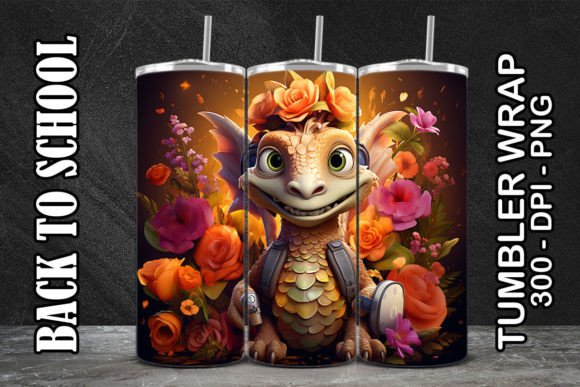
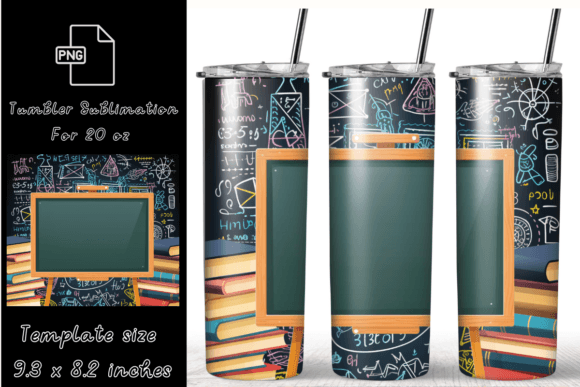
For sublimation professionals and small-batch producers, the Back to School Tumbler, 20 Oz Tumbler isn’t just another design—it’s a production-ready asset built for speed, consistency, and real-world usability. This digital download delivers a full-wrap tumbler template sized precisely for standard 20 oz skinny tumblers (9.3 × 8.2 inches), with both straight and tapered PNG variants included at 300 dpi resolution. It’s designed to integrate directly into your existing workflow—not as an afterthought, but as a calibrated component that reduces setup time, minimizes trial-and-error, and supports repeatable output.
How It Fits Into Your Production Workflow
You don’t start with a tumbler design—you start with intent. Whether you’re launching a back-to-school campaign for a local school PTA, building inventory for an Etsy shop ahead of August demand, or fulfilling custom orders for teachers and students, timing matters. The Back to School Tumbler, 20 Oz Tumbler file is structured to slot in at the execution stage: after concept approval, before print calibration, and immediately prior to pressing. Because it arrives pre-sized and optimized, you skip the manual resizing, distortion checks, and bleed adjustments that often derail first-run batches.
This isn’t a placeholder or mockup—it’s a functional layer in your sublimation pipeline. You import it into your design software (e.g., Photoshop, Affinity Designer, or Canva Pro), align your brand elements or typography within the safe zone, and export directly to your sublimation printer. No SVG conversion needed. No vector tracing. No guesswork about wrap curvature or seam placement. That level of readiness translates directly into fewer misprints, less wasted blanks, and tighter turnaround on client orders.
Compatibility and Setup Considerations
The ZIP includes two high-resolution PNG files: one for straight-walled tumblers and one for tapered profiles. Both are 300 dpi, which ensures crisp edge definition when printed on sublimation paper—critical for clean text, fine lines, and consistent color gradients. Since PNGs retain transparency and don’t embed fonts or vectors, they work reliably across platforms without font substitution errors or scaling inconsistencies. That makes them especially valuable if you collaborate with freelancers or outsource prep work: the file behaves predictably whether opened on Windows, macOS, or Chromebook-based design tools.
Importantly, this file is not editable as SVG—and that’s intentional. It’s delivered as a raster asset because sublimation printing requires pixel-perfect alignment with the physical blank’s surface area. Vector files introduce unnecessary complexity: path offsets, anti-aliasing artifacts, and unpredictable rasterization during RIP processing. By using the provided PNGs, you maintain control over how halftones render, how shadows blend, and how white space interacts with the tumbler’s metallic finish.
Practical Implementation Tips for Consistent Output
Test before batch printing. Even with a pre-sized file, always run a single test press on a low-cost blank. Check seam alignment, color saturation, and edge bleed—especially near the base and lip where taper distortion most commonly occurs. Adjust your press time and temperature based on your specific heat press model and blank brand, not the design file itself.
Organize by use case, not just size. Keep your “Back to School Tumbler, 20 Oz Tumbler” folder separate from generic templates. Include notes in your file manager: e.g., “Tapered version tested with Thermoflex 20oz blanks, 380°F × 60 sec.” Over time, this builds internal documentation that accelerates future launches.
Batch your prep, not just your press runs. If you’re producing multiple variations—different slogans, grade levels, or school colors—duplicate the base PNG and add your localized text layers *above* it (not inside). That preserves the original file integrity and lets you regenerate variants without re-importing or repositioning the wrap guide.
Integration With Broader Business Systems
This design doesn’t exist in isolation. It connects directly to your inventory planning, marketing calendar, and fulfillment rhythm. For example, educators and school supply retailers often begin promoting back-to-school items in early July. Having a production-ready tumbler design like this means you can lock in your product listing by mid-June, generate accurate mockups for social ads, and schedule your first press run to coincide with peak search volume—not scramble to finalize assets while competitors ship.
It also interfaces cleanly with common e-commerce tools. Upload the PNG to Printful or Gelato as a custom product variant; pair it with your branded packaging workflow in ShipStation; or drop it into Canva’s bulk-create tool to generate dozens of social thumbnails in under ten minutes. Because it’s standardized and resolution-locked, automation tools process it without error—no need for manual cropping or DPI overrides.
Quality Control and Long-Term Usability
Consistency starts with clarity—and this file delivers both. The 9.3 × 8.2 inch dimensions reflect industry-standard measurements for 20 oz skinny tumblers, verified against top suppliers including Simple Modern, Tervis, and generic wholesale blanks. That means your first press matches your tenth press, assuming stable equipment calibration and consistent paper quality.
Long-term, treat this file as a foundational asset—not disposable content. Store it in a version-controlled folder (e.g., “Tumbler Templates / BackToSchool / v1_2024”). If you later adapt it for 30 oz or insulated versions, create new folders rather than overwriting the original. That preserves repeatability and avoids accidental use of mismatched dimensions down the line.
Real-World Use Cases Across Roles
- Educators & PTAs: Print 50–100 units for school fundraisers. Use the tapered version for standard student-grade tumblers; pair with simple name personalization via a spreadsheet mail merge.
- Freelance designers: Bundle this file with your branding package for education clients. It signals operational readiness—not just visual appeal—and helps justify premium pricing for end-to-end deliverables.
- Small business owners: Stock up on blanks in June, press in batches of 20, and list on Shopify with staggered launch dates (e.g., “Teacher Appreciation Week,” “First Day of School,” “Study Season”).
- Hobbyists & makers: Use the straight version for DIY sublimation kits or craft fair inventory. Its clean edges and balanced layout make it forgiving for entry-level presses with uneven pressure distribution.
This isn’t about chasing trends—it’s about removing friction from a proven process. The Back to School Tumbler, 20 Oz Tumbler works because it respects how sublimation actually happens: in controlled environments, with calibrated equipment, and under time-sensitive deadlines. It assumes you already know your press settings, your paper brand, and your blank supplier. What it provides is precision where it counts—so you spend less time troubleshooting alignment and more time shipping finished products.
Remember: this is a digital file only. No physical item ships. You’ll apply it to real tumblers yourself, using your own equipment and materials. And because it’s licensed for physical production—not redistribution—you retain full creative control over the final item, while respecting the designer’s terms around reuse and resale. That balance—between flexibility and boundary—is what makes it sustainable for both creators and customers.