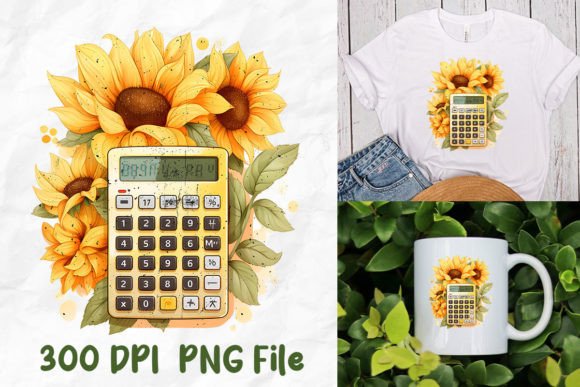
Back to School Calculator Sunflower
Imagine launching the new school year with a design that’s both functional and joyful—a cheerful sunflower motif paired with a practical calculator layout. The Back to School Calculator Sunflower isn’t just another clipart download. It’s a purpose-built digital sublimation file set designed for creators who value clarity, consistency, and creative flexibility. Each design is hand-crafted to balance educational utility with visual warmth—making it ideal for classroom decor, student planners, teacher gifts, or even custom merch for school spirit days.
What You’ll Actually Get (No Surprises)
After purchase, you’ll receive a ZIP file containing individual PNG files—each saved in a unique file format optimized for sublimation workflows. These are not layered PSDs or editable vector files; they’re high-resolution, transparent-background PNGs ready for immediate use in compatible software like Cricut Design Space, Silhouette Studio, Canva (with proper upload settings), or sublimation-specific platforms such as Sawgrass Creative Studio.
Important: This listing is for digital sublimation files only. No physical items will ship. Before downloading, confirm your design software supports PNG imports at 300 DPI and handles transparency correctly. And rest assured—your downloaded files will be clean, watermark-free, and production-ready.
Creative Possibilities That Go Beyond the Obvious
The Back to School Calculator Sunflower works because it merges two strong visual concepts: the reliability of calculation tools and the optimism of sunflower imagery. That duality opens doors across multiple creative paths:
- Classroom Tools: Print on laminated cards or dry-erase boards for math centers. Add magnetic backing for whiteboard use—students solve problems while surrounded by friendly, sunflower-themed visuals.
- Teacher Appreciation Kits: Combine the calculator sunflower with “Thank You” text and a chalkboard background. Sublimate onto mugs, tote bags, or notebook covers for meaningful, personalized gifts.
- Student Planners & Organizers: Layer the design into weekly spreads—use it as a subtle header for “Homework Tracker” or “Goal Check-In” sections. Its clean lines hold up well when scaled down to fit planner inserts.
- Digital Learning Assets: Import into Google Slides or PowerPoint as interactive slide backgrounds. Pair with clickable answer buttons or drag-and-drop math elements for remote lessons.
- Small Business Branding: A tutoring service or after-school program can adapt the sunflower calculator as part of their logo suite—or use it consistently across social media banners, email headers, and printable worksheets.
How Different Users Can Adapt It With Purpose
Educators might focus on accessibility: resize the calculator grid to match large-print needs, adjust color contrast for dyslexia-friendly reading, or pair it with tactile stickers for hands-on learners. Consistency matters here—using the same sunflower style across handouts, slides, and bulletin boards builds familiarity and reduces cognitive load.
Freelance designers can treat the Back to School Calculator Sunflower as a modular asset. Swap out background colors to match client brand palettes. Overlay editable text layers in Canva or Affinity Designer to create variations—“First Day Countdown,” “Reading Log Calculator,” or “Science Lab Safety Check.” Because each PNG is unique, you avoid accidental duplication in client deliverables.
Small business owners running print-on-demand shops benefit from its versatility. Use one version for back-to-school apparel (think t-shirts with “My Brain + This Calculator = Ready!”), another for classroom posters (“Sunflower Math Rules!”), and a third cropped tightly for enamel pin mockups. Since all files are sublimation-optimized, you minimize rework during production setup.
Hobbyists and makers appreciate how cleanly these files integrate into craft workflows. Try heat-transfer vinyl cutting with the sunflower outline, then layer a contrasting calculator grid behind it. Or use the PNG as a stencil base for hand-painted wooden rulers or acrylic desk organizers—its crisp edges translate well across mediums.
Keeping Your Results Clear, Consistent, and Audience-Friendly
Clarity starts with intention. Ask yourself: Who sees this first—the student, the parent, the buyer, or the end user? If it’s a child, simplify text overlays and prioritize bold, legible fonts. If it’s for resale, ensure alignment with platform requirements (e.g., Etsy’s 2000×2000px thumbnail standard or Redbubble’s bleed-safe dimensions).
Consistency doesn’t mean repetition—it means thoughtful variation. Use the same sunflower stem shape across multiple designs, but rotate the calculator grid orientation (vertical vs. horizontal) depending on the product. That creates cohesion without monotony.
To keep things original: avoid overused phrases like “A+ Student” or “Math Magic.” Instead, lean into authentic voice—“My Calculator Grows With Me,” “Solve Today, Bloom Tomorrow,” or “Where Numbers Meet Sunshine.” These reflect real classroom values while standing out in crowded digital marketplaces.
Realistic Tips for Getting Started
You don’t need advanced software to begin. Start small: open one PNG in Canva, add your own font and color, and export a test version for a single product. Test print on scrap paper before committing to full sublimation runs. Check how shadows, highlights, and fine lines render at different sizes—especially if scaling below 4 inches wide.
If you're building a series, batch-process filenames logically (e.g., “sunflower-calculator-math-center-v1.png”, “sunflower-calculator-teacher-gift-v2.png”). This saves time later when organizing assets or sharing folders with collaborators.
Finally, remember that usefulness multiplies when shared thoughtfully. A teacher using this design in a free downloadable worksheet can credit your shop name in the footer—giving you organic exposure while adding value for their audience. That kind of quiet collaboration is where sustainable creative work begins.
Why This Fits Real Creative Workflows
The Back to School Calculator Sunflower succeeds because it respects your time and expertise. It’s not generic filler—it’s a focused tool built for people who know what works in classrooms, studios, and small production environments. Whether you’re prepping for August or planning ahead for next year’s curriculum refresh, these files offer reliable starting points—not rigid templates.
They invite adaptation, not imitation. You bring the context. They bring the foundation. And together, you build something students notice, teachers appreciate, and buyers remember.