5th Grade Back to School T-Shirt SVG: A Digital Download Guide for Teachers, Parents & Crafters
Starting 5th grade is a big milestone—students step into more complex math, deeper reading comprehension, and greater independence. Celebrating that transition with a fun, personalized 5th Grade Back to School T-shirt SVG is more than just a fashion statement—it’s a confidence booster, classroom tradition, and creative opportunity. But if you’re new to digital design files, terms like “SVG,” “DXF,” or “digital download” might feel confusing. Let’s break it all down clearly—no jargon, no overwhelm.
What Exactly Is a 5th Grade Back to School T-Shirt SVG?
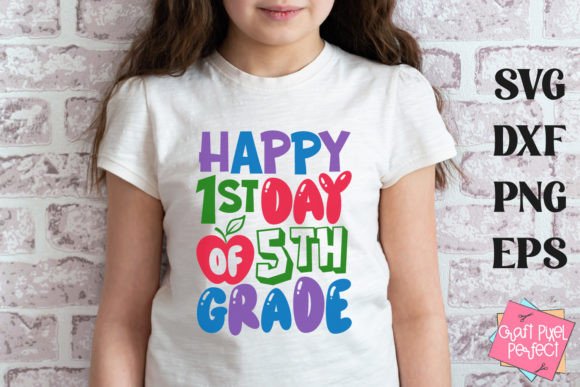
An SVG (Scalable Vector Graphic) is a type of digital file used in crafting and design. Unlike photos (JPG or PNG), SVGs are made of mathematical paths—not pixels—so they scale infinitely without losing quality. That means your “Happy 1st Day of 5th Grade” design will look crisp whether you cut it small on a toddler’s shirt or large on a teacher’s hoodie.
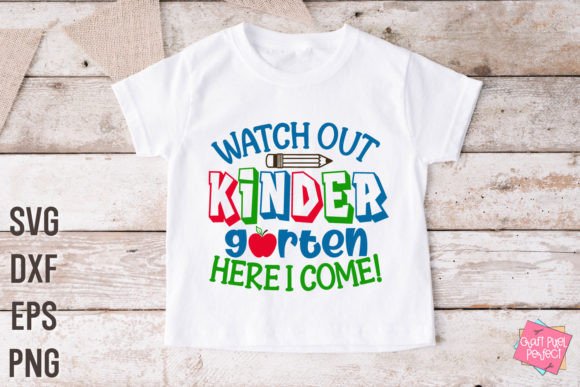
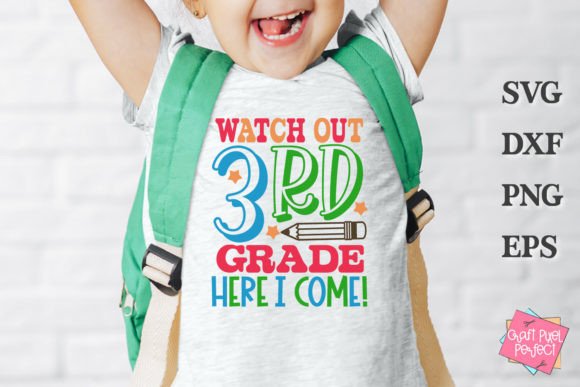
This particular listing offers a DIGITAL DOWNLOAD—not a physical shirt or printed item. You’ll receive one ZIP folder containing four versatile file formats:
- SVG file — Ideal for Cricut Design Space and newer Silhouette Studio versions.
- EPS file — A professional vector format compatible with Adobe Illustrator and advanced cutting software.
- DXF file — Universally supported by older Silhouette machines and many third-party cutting programs.
- PNG file with transparent background — Perfect for printing, sublimation, or adding to digital class newsletters and social media posts.
All files feature clean, kid-friendly lettering and optional playful elements—like stars, pencils, or graduation caps—that reflect the spirit of 5th grade excitement.
Why Choose a Digital File Over a Pre-Made Shirt?
Digital downloads offer unmatched flexibility, speed, and personalization—especially for educators, PTA volunteers, and home crafters. Imagine:
- A 5th-grade teacher ordering 25 matching shirts for her class—and customizing each one with a student’s name using the same SVG file.
- A parent creating a “Big Sibling” tee for their kindergartener to wear on the first day—paired with their 5th grader’s shirt—using the same design family.
- A homeschool co-op printing the design on tote bags, water bottles, and notebooks—all from one purchase.
There’s no waiting for shipping, no minimum order fees, and no inventory risk. Plus, you control colors, sizes, materials, and timing. It’s eco-conscious (no packaging waste) and budget-smart (one-time purchase, unlimited uses for personal or classroom projects).
Who Can Use These Files—and What Do You Need?
You don’t need to be a graphic designer—or even own a cutting machine—to benefit. Here’s who uses these files regularly:
- Teachers & School Staff: Create welcome kits, door decorations, bulletin board letters, or spirit-day apparel.
- Parents & Grandparents: Make heartfelt gifts, memory keepsakes, or sibling matching sets.
- Craft Enthusiasts & Small Business Owners: Produce custom items for local fairs, Etsy shops, or school fundraisers (with proper licensing—more on that below).
- Homeschool Families: Mark academic milestones with meaningful, hands-on traditions.
To use the files, you’ll need compatible software and hardware:
- Cutting machines: Cricut Maker, Cricut Explore Air 2, Silhouette Cameo 4/5, Brother ScanNCut, or USCutter with Sure Cuts A Lot.
- Software: Cricut Design Space (free), Silhouette Studio (Basic edition supports DXF/SVG), Adobe Illustrator (for EPS), or Inkscape (free, open-source option for SVG editing).
- Important note: This is a digital product only. No physical item ships. You must have the right tools and know-how—or access to someone who does—to cut, print, or apply the design.
Clarifying Common Misunderstandings
Let’s clear up frequent points of confusion:
“Is this a printable PDF I can color?”
No. While the PNG file *can* be printed and colored, the core purpose is cutting—especially for iron-on vinyl, heat transfer, or adhesive vinyl projects. If you want a coloring page version, check with the seller separately.
“Can I sell shirts I make with this design?”
Not unless you’ve purchased an extended commercial license. This listing includes personal and single-classroom use rights only. All designs are © Craft Pixel Perfect and protected under U.S. copyright law. Selling finished products (e.g., t-shirts on Etsy) requires explicit permission—and often a separate license fee.
“Do I need internet every time I cut?”
For Cricut: Yes, Design Space requires online access for most operations. For Silhouette Studio: The free Basic Edition works offline once installed—but some features (like cloud storage or advanced tracing) require a paid subscription.
How This Fits Into Modern Learning & Creative Culture
In today’s classrooms, personalization isn’t just nice—it’s pedagogically powerful. When students see their grade level celebrated in a tangible, joyful way, it reinforces identity, belonging, and growth mindset. Teachers report higher engagement during “first-week rituals” when students wear coordinated gear—even virtually, via Zoom backgrounds featuring the same PNG file.
On the tech side, digital cut files bridge creativity and STEM literacy. Kids learning about vectors in math? They’re literally manipulating coordinates when resizing an SVG. Students exploring digital art? They’re practicing layering, grouping, and alignment—skills that translate directly to coding logic and design thinking.
And for families navigating hybrid schedules or tight budgets, DIY back-to-school crafts offer shared screen-free time, fine motor practice, and pride in making something together—no special talent required.
Getting Started: Your First Cut in 4 Simple Steps
- Download & unzip: After purchase, locate your email confirmation and download the ZIP folder. Right-click → “Extract All” (Windows) or double-click (Mac).
- Open in your software: Launch Cricut Design Space or Silhouette Studio. Click “Upload” → select the SVG or DXF file.
- Resize & prepare: Adjust dimensions to fit your material (e.g., 10" wide for a youth shirt). Check “Weld” or “Attach” if layers need to stay grouped.
- Cut & apply: Load your vinyl or HTV, set material type, and cut. Then weed, heat press (or iron), and enjoy!
Pro tip: Test on scrap material first—especially with glitter or specialty vinyl. And always mirror your design before cutting heat-transfer vinyl.
Final Thoughts: More Than Just a T-Shirt
A 5th Grade Back to School T-shirt SVG is a small digital tool with big emotional resonance. It helps mark time, honor effort, and spark joy at the start of a pivotal school year. Whether you're a seasoned crafter or opening Silhouette Studio for the very first time, this file gives you the freedom to create meaning—on your terms, in your time, with your people.
Just remember: You’re not buying pixels—you’re investing in connection, creativity, and the quiet magic of showing up ready, together.