Editable Back to School Planner Canva
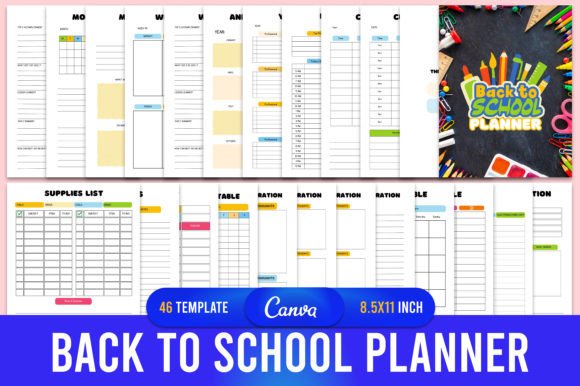
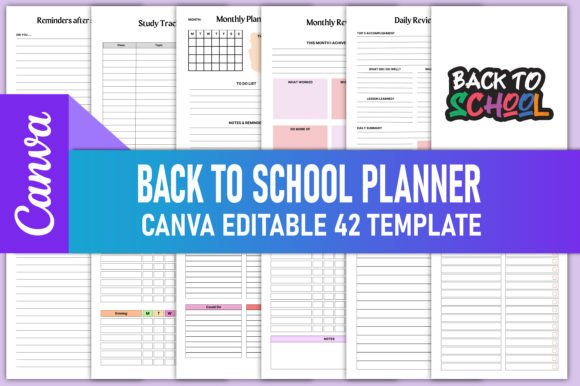
If you're building digital planning products for students, educators, or homeschool families—and especially if you're publishing on Amazon KDP—you need tools that balance flexibility with polish. The Editable Back to School Planner Canva delivers exactly that: a thoughtfully structured, fully customizable 42-page planner system designed from the ground up for real-world use and commercial readiness.
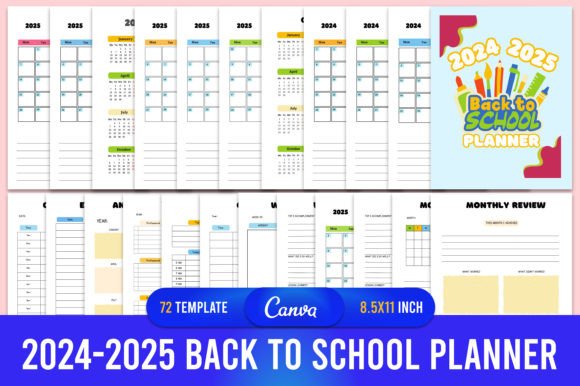
This isn’t a generic template slapped together with placeholder text and inconsistent spacing. It’s a cohesive design system—built in Canva, optimized for KDP, and tested across devices and print workflows. Every page serves a purpose: from the Annual Overview and Yearly Goals spread to granular trackers like My Daily Chore Tracker, Exam Timetable, and Reading Routine. The layout breathes—ample white space, clear visual hierarchy, and intentional alignment make scanning effortless. It feels calm but purposeful, organized but not rigid.
The aesthetic leans into clean, modern typography with subtle warmth—no harsh edges or sterile minimalism. You’ll find balanced sans serif headings (think friendly, readable, slightly rounded), paired with highly legible body fonts that support long-form writing and daily note-taking. There are no decorative script flourishes or distracting embellishments. Instead, there’s consistency: consistent margins, uniform bullet styles, logical section dividers, and intuitive iconography (like checkmarks, clocks, and books) used sparingly and meaningfully.
Why This Planner Fits Real Creative Workflows
Designers and publishers know that editable templates only succeed when they adapt—not just visually, but functionally. The Editable Back to School Planner Canva gives you full control over color schemes, text labels, headers, and even layout order. Want to rename “Weekly Review” to “Reflection & Reset”? Done. Need to add a custom section for IEP goals or dual-language homework tracking? Paste it in. Prefer navy and sage over teal and coral? Swap the palette in seconds—no design software required.
That flexibility matters most when you’re preparing files for KDP. The package includes high-resolution, print-ready PDFs (CMYK, 300 DPI, 8.5 × 11", no bleed), plus PNG and JPG versions for social previews or website mockups. Everything is pre-tested against KDP’s file requirements—no last-minute cropping surprises or color shifts. You’re not just buying a planner; you’re getting a production-ready asset stack.
How It Performs Across Use Cases
For entrepreneurs launching a stationery brand, this planner is a launchpad—not a limitation. You can rebrand it as your own, add your logo to cover pages, insert affiliate links in resource sections, or bundle it with printable stickers or habit cards. Its modular structure makes bundling intuitive: pair the Back To School Preparation and Supplies List pages with a “First Week Survival Kit” mini-guide, or combine the Vision Board Ideas and My Bucketlist spreads into a goal-setting workbook.
Bloggers and educators use it to create companion resources—embedding the Canva link directly into a “Free Download” call-to-action, then guiding readers through customization steps in a short tutorial video. The fact that users can edit it themselves means less support overhead and higher perceived value. No more “PDF-only” complaints—this is truly interactive, even before printing.
And for small business owners selling on Etsy or Gumroad, the inclusion of PNG/JPG files opens up merchandising options: use the Study Tracker layout as a phone wallpaper, crop the Vision Board Ideas spread into Instagram carousels, or animate the Daily Checklist as a Reel template. It’s not just a planner—it’s a set of reusable design assets.
What Makes It Stand Out From Generic Planners
Most editable planners sacrifice structure for flexibility—or vice versa. This one holds both. Notice how the School Timetable uses a clean grid with labeled time blocks, while the Extra-mural Timetable offers staggered columns for dance, coding club, or volunteer hours. The Responsivity Reminders page doesn’t just list tasks—it separates “before bed” and “after bed” actions with distinct visual cues, reinforcing behavioral intention without clutter.
Typography plays a quiet but critical role here. Headings use a confident, slightly condensed sans serif—ideal for scannability in both digital preview and printed format. Body copy relies on an open, generous x-height font that remains crisp at small sizes (crucial for timetable cells or journal lines). There’s no forced “cute” handwriting font interrupting flow—just clarity, consistency, and calm authority.
You’ll also appreciate thoughtful details: Important Dates has space for notes *and* contact info; School Parents Meetings includes checkboxes for follow-up items; MY DAILY CHECKLIST TO DO LIST uses progressive indentation to distinguish priorities from routine tasks. These aren’t decorative touches—they’re usability decisions made by someone who’s actually used a planner under deadline pressure.
Getting Started—Practical Next Steps
Once you receive your download, you’ll get a Canva link + ZIP containing all final files. Open the Canva file, click “Make a Copy,” and start editing immediately—no design skills needed. Change colors using Canva’s color picker, swap fonts (though the default pairing works beautifully), adjust spacing, or hide pages you don’t need.
Before uploading to KDP: export as PDF (not “Print to PDF”), double-check page count (42), confirm CMYK mode, and verify trim size matches 8.5 × 11". Run a soft proof in Adobe Acrobat to catch any unintended transparency or font fallback issues. If you’re bundling multiple planners, use the same cover style and interior font family across titles—it builds recognition and trust.
This planner doesn’t ask you to fit your audience into its framework. It invites you to shape it around their needs—whether that’s accommodating neurodiverse learning rhythms, bilingual households, remote learners, or teachers managing five preps. That’s why it works so well across niches: it’s built on observation, not assumption.
You’ll get more than files. You’ll get confidence—knowing every page supports focus, not friction. And in a market flooded with rushed, repetitive digital products, that kind of intentionality is rare. The Editable Back to School Planner Canva doesn’t just help people plan. It helps them show up—more prepared, more grounded, more ready.